Skip to content

2006

Intrusive Google ads on Sourceforge

Intrusive Google ads on Sourceforge
Come on, I can understand Sourceforge needs the Adsense revenue, but this is going too far. A huge 450 x 400 blue advertisement is blocking access to most download links on a Sourceforge download page, and there is no way to make it disappear, no [X] button in the top right or a “hide this” link.

Youtube for PDF: embedding documents

PDF Documents

Playing around with embedded Google calendars and reading “Google Apps and the power of embedded functionality“, I got to thinking: what would be other good candidates for a 1-click-embedding provider of other types of documents. I wondered e.g. whether there was something like Youtube for audio (yes, there is. GoEar.com is one example). But then I thought of a document type we all have learned to love and hate: Adobe’s Portable Document Format or PDF.

The idea behind the PDF file format is valuable: create a cross-platform standard for exchanging and printing documents that includes the text, images, fonts and their layout. The Acrobat Reader is a free application, and while Adobe’s PDF Writer is a commercial product (from $299), there are enough free alternatives to counter that. The thing is: PDF is great for printing, but not for browsing.

When you click on a PDF link, one of multiple things might happen:

  • If the web server does not send a header “Content-Type: application/pdf“, your browser has no clue what to do with the file: it will let you download the file and that’s all
  • if Acrobat is not installed, you can also only download the file, because your browser will not know what to do with files of type application/pdf
  • if Acrobat is installed, but you work with a browser that is not tightly linked to the OS (e.g. Firefox on Windows), it still might not open in Acrobat.
  • if your browser has configured Acrobat as a helper application, the file will download and will then be opened with the reader. So you will have 2 applications open: your browser and Acrobat Reader. This is actually the best method.
  • With Internet Explorer on Windows, Acrobat will open inside your browser, and your menu bar will become an interesting mix of IE and Acrobat options. (Where is the print button? Ah-ha!!) When you close the browser, a copy of Acrobat will continue to run in an invisible way, taking up some 32MB of memory
  • If you had no indication how big the PDF file was, you might be fiddling your thumbs for the next 5 minutes while the document is being downloaded.
  • If the document uses fonts that you don’t have, you might be looking at a very weird layout

So you are screwed if you don’t have Acrobat, if it is a really big document or if you access through a misconfigured browser. This is the equivalent of clicking on a .AVI movie file without a clue of how big the movie is, whether you have the necessary audio and video codecs to see it, and whether it’s worth it. If that was largely solved by a service provider like Youtube, what would a similar service for .PDF files look like?

Colorbar: belgian spam

Colorbar: belgian spamIn the last three days I have received 3 mails from Colorbar, a “lively private club for colorful people”. The first one didn’t trigger my suspicion, since I am subscribed to some music-related mailing lists. The two next mails came for 2 @forret.com aliases of which I am certain they never subscribed to any list. So I took a closer look at the email. No contact details are given, no indication of where the email addresses came from, no possibility to unsubscribe, i.e. it’s a spam mail. To be even more specific: a belgian spam message.

How to upsize an image

Printing in larger sizes

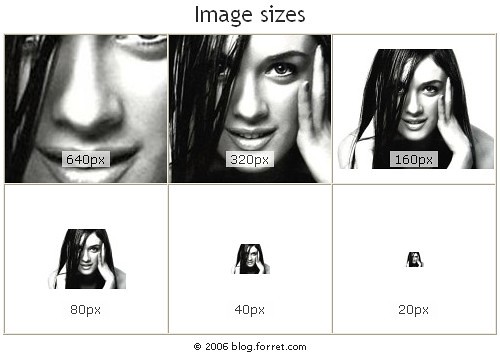
I have a Canon 350D digital camera. At 8 megapixels, it’s in the semi-pro league, and allows me to make 293mm x 192mm (11.5″ x 7.7″) hi-quality prints. That’s slightly smaller than an A4 (or Letter) sheet. Imagine now I would want to print on an A0 format or 1189mm x 841mm (46.8″ x 33.1″). That’s 16 times as big (height x 4 and width x 4). I could take a ‘normal’ image and rescale it to that size, but what would that look like? For every 16 pixels of the new picture, 1 would be an original one, and the other 15 would have been guessed from that and the surrounding pixels. This process is called image interpolation and there are different algorithms to do this. Let me show what that looks like.

Interpolation algorithms

Image sizes

Tangotation: writing tango steps

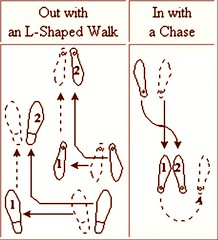
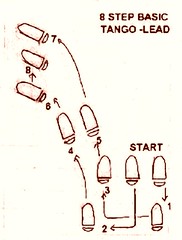
I have been looking for a way to write down tango steps since I began dancing. I experimented with drawing arrows, writing full text, abbreviations, inventing signs, … I’m not alone in this quest:
Tango notation: larrydla or Tango notation: nfo.net

And that is only when you take into account the feet. The Labanotation system (developed by professional dancers) has a graphical element for each movement of the legs and arms.
Labanotation: dance notation
While this is probably one of the best systems around, it’s too complicated for us laymen dancers. So I decided to distill a base vocabulary for writing down tango steps: Tangotation.

Pukkelpop 2006

Pukkelpop festival

Zaterdag 034Pukkelpop is the last of the big summer festivals, and for me, the best. It might be the Limburg influence, something in the water, or the relaxed guidance of its founder, Chokri Mahassine, but everyone working at the festival seems to be so happy and aiming to please.
I spent most of my time there at the press lounge, in the pleasant company of Clo, Zabine, Bart, Ben, Gunther, Sylvie, Lien, Vanessa and so many others. I also received a much-too-short massage from Tamara at the Coca-Cola booth. Clo has pictures, so they’re bound to show up at some moment.

Interesting Flickr

Last year, when Flickr wanted to create a ranking system for its pictures, they developed an algorithm for “interestingness”.

Sound of cause
Flickr photo by tkproject2004

There are lots of things that make a photo ‘interesting’ (or not) in the Flickr. Where the clickthroughs are coming from; who comments on it and when; who marks it as a favorite; its tags and many more things which are constantly changing. Interestingness changes over time, as more and more fantastic photos and stories are added to Flickr.
from About Interestingness

Taking into account views, comments, notes, favorites and user reputations, it is an advanced wisdom-of-the-crowds long-tail recommendation engine. The exact formula is unknown and the indivual ‘interestingness’ score of a photo cannot be displayed. Just like with Google PageRank, people try to guess how it works internally.

Rule of thirds for Powerpoint

Just a thought I had:
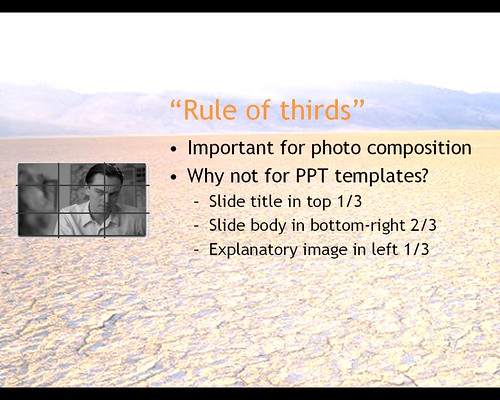
if the “rule of thirds” is so effective for photo composition, could it also be used to create more pleasing Powerpoint presentation designs?
An example of the layout dimensions could be like this (don’t focus on the boring picture/font, just the relative placement):
Rule of thirds for Powerpoint (no rules)

iPod in 2009: more storage or bandwidth?

I had an interesting discussion some days ago: will the iPods move to more storage (e.g. the Terabyte iPod) or more bandwidth (Bluetooth, EDGE, Wifi). Let me sketch what those two scenarios for the future iPod look like:

2009 iPod as personal media storage

iPod Video 16:9That new iPod ‘3D’ might not be much bigger than the current 60GB iPod video, but it has a better 16:9 screen, and way more storage. It ships with a 500GB Flash card that is replaceable. You typically buy more storage cards: 1 for all your music, 1 for essential movies (with that Hitchcock and Tarantino collection), 1 for TV series (one season is around 15GB) and fill them up from your 50TB home media set-up.
The sleek white player has wireless USB and uses wireless battery reload (with magnetic holder) so you don’t need a cable for anything. Your 5.1 headphones: wireless. Copying from that 50TB iTunes/Tivo media station: wireless. Hooking it up to an HD-TV: wireless. Sure, it has Gigabit Wifi too (which is really only around 250Mbps, but we’re used to that from the 802.11 guys), but not everyone uses that yet, certainly not in that Ardennes village where you booked that small hotel for your “24” marathon (12 seasons, who would have thought? Thank god for the 2x hi-speed viewing mode).
It can obviously play the new “3HD” (3-dimensions) standard, which is really neat if you have one of those new holographic projectors. If you have subscribed to the (rather expensive) iTunes ‘Premium Hollywood’ service, you get all new movies on your iPod at the same moment when they are released in the cinemas. You only get them at consumer-grade HD resolution (2048×1080 – looks OK on that 50″ screen), not at the new DCI 8K standard for movie theatres (8192×4320 with HDR) but who’s complaining.