Google Docs’ infamous "Moved Temporarily" error – fixed!
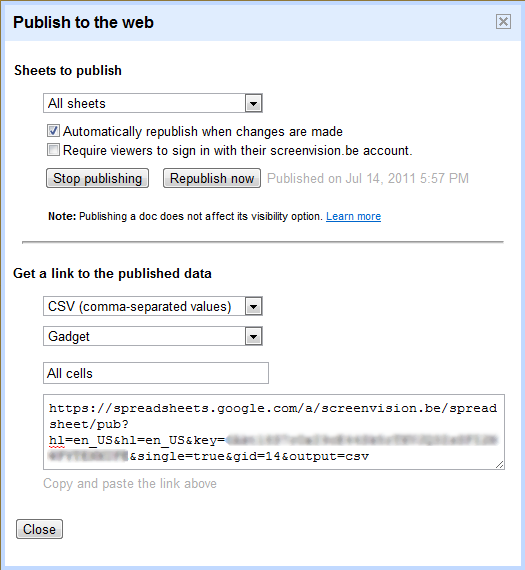
I store quite a lot of info in Google Spreadsheets, for the obvious reasons:
I store quite a lot of info in Google Spreadsheets, for the obvious reasons:
I use Google Calendar as a vital piece of milonga.be: me and some 20 other editors keep an up-to-date calendar of tango events in Belgium. We’ve been doing that for the last 3 years, so there was a lot of old, no-longer-relevant data in the agenda. The way I use the calendar on the site is that I download all the appointments as a .ICS (iCal/gCal) file and then format/display it with another program. But with all the old data still present, that ICS file had grown to more than 1MB, and this size slowed down the updates (I download the whole thing every 30 min). So I decided to delete all old data (2007 – 2009). Not that easy.
Wouldn’t this be a great idea: the Brussels public transport not mapped by MIVB‘s horribly unpractical route planner, but by Google’s Transit maps. You just need to get an export of the stops, the routes and the times, and they can be shown on Google Maps just like that. Where should we start looking for the source data? Then create agency.txt, stops.txt, routes.txt, trips.txt, stop_times.txt, calendar.txt and that’s it.
I am using Google Agenda as the central repository for the milonga.be Belgian tango agenda, which I edit together with half a dozen other tango enthusiasts. While the principle of a central, hosted calendar storage works wonderfully, I (have to) use a modified PHPiCalendar to display different views on the agenda (‘only Brussels’, ‘only workshops’, ‘1 week in advance’, ‘1 month in advance’, …). There are actually a couple of features that I’d like to see in Google Agenda, and what better place to list them but here:

Currently an event in the agenda has the fields Title, Date/time (with recurrency, if any) , Location and Description. What I really miss is Tags (or categories, keywords, whatever you want to call them). Tags would allow me to attribute events to categories so that I can easily slice and dice them: only display the “milonga’s”, the events in Antwerp, the events in a specific place. Now I had to write a modified ‘filtered printable view’ for PHPiCalendar so that I can search on specific words in the event title, but that is really a hack. E.g. I now ask every editor to create the event titles as
“[TYPE]: [name of the event] @ [LOCATION]”
so that I can filter on “CONCERT:” or “@ Gent”. With the tags “concert, gent, polariteit, openair” it would be so much easier.
The iCalendar specification even mentions a ‘Categories’ field, although Google Agenda currently does not use it.
I have been working a bit on Google Maps visualisations for my milonga.be tango site, to show an overview of all Belgian tango sites. I did it the following way:
IFRAME). I decided to use the frame approach and build a generic KML visualizor.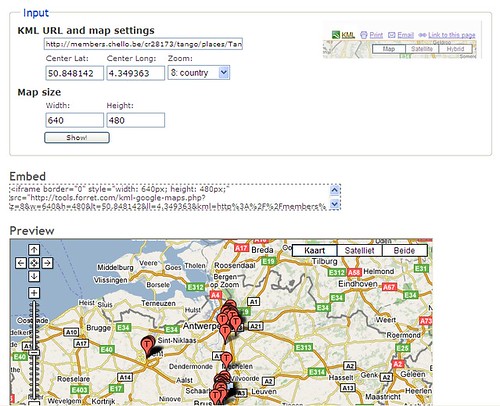
So how can you use it to show any KML/GeoRSS feed on your website?

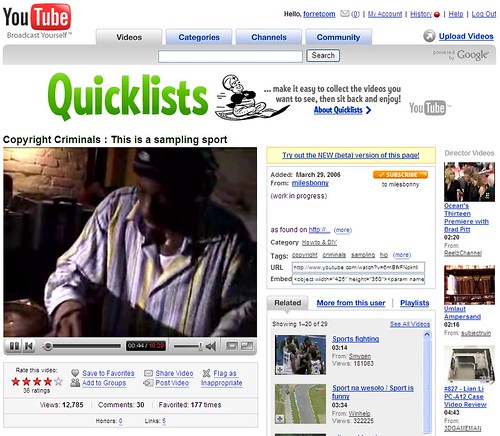
IFRAME HTML code. Voila!This is what a YouTube clip page looks like now:
 When I started dancing argentine tango, there were two sites that gave you an update of where and when you could dance tango in Belgium. The first one was tango.be, with a frame-based layout that I don’t find the most user-friendly nor visually pleasing, and the second www.milonga.be, with a Flash-based agenda that was quite easy to use. Unfortunately the editor of the latter had to stop the site due to lack of time. Two weeks ago I noticed that he had even let the domain name expire and it was free again. Five minutes later I was the new owner of milonga.be. My goal: to make it again into a comprehensive overview of where to take tango courses and dance tango in Belgium.
Oh, what can I say, I know WordPress so well now, I use it wherever I can. So yes, it’s a WordPress site, with the K2 template, but with (currently) only static pages and no posts. I’ve divided the site into 2 parts: where to follow classes, and where to go dancing (practicas, milongas, salons, workshop). I’m obviously going to sprinkle some Web2.0 gold dust on the project. One example of this: Google Calendar.
Whether Twitter will turn out to be a conversational revolution or a giant waste of time, I’m still not sure about. Sometimes it feels like instant messaging (chatting *with* someone), sometimes like just changing the subtitle of your MSN/Gtalk (just a shout, no specific destination), sometimes it’s more like talking to yourself. But make no mistake: you are not just talking to yourself!
Thanks to its huge geek-appeal (over 145.000 backlinks in Technorati), Twitter is well on its way towards a respectable PageRank 8. Twitter also uses pretty URLs, (twitter.com/[user]/statuses/[messageid] ), which Google likes a lot. Twitter also generously links from one account to the other (Twitter Friends). And Twitter has a LOT of (small bites of) content. As a result of that, whatever you say in Twitter may come back to haunt you through Google.
Exhibit 1: Pietel

When you do a Google search for “Pietel”, his Twitter account shows up as result #4 of 226.000. Being the good boy that he is, he just wrote that he finished his work assignment at home. But if his last remark would have been: “stupid job, silly colleagues, moron boss“, would he like that to show up on Google?
(depending on what Google server you fall, your results might be different, but the Twitter result has a good chance of ending up on the first page of results).
 When I search for Roos Van Acker (in the Google sense of searching), I have 2 sites that show up in the top results: a blog post of mine and the Flickr picture you see at the right. My blog has a Pagerank 6, so that explains why it can score high in searches, but I was sometimes surprised when my Flickr pictures showed up high in Google results; until I noticed that my Flickr stream also had a Pagerank 5. So maybe I had more PR firepower that I suspected. I decided to make an inventory of all sites under my control and see how high their PR is: my Pagerank inventory.
(for more info on Pagerank, check google.com and wikipedia. In short: Google gives each page a ‘weight’ or importance indicator called Pagerank. Pagerank 4 (PR4 in short) is OK, PR7 is kinda hard to get (right, Bart?), PR9 is only for sites like yahoo.com and ebay.com, and PR10 is the absolute maximum (the only site I know with a PR10 is google.com).
Brad Garlinghouse, a Yahoo senior vice president, has written an internal memo (that leaked, obviously) stating that it is about time for Yahoo! to bite the bullet and start reorganising/refocusing.
This is the first time I noticed this: an email in my Gmail with Excel attachments offers me the option to view the document in Google Spreadsheets.

