Skip to content

photography

100.000 Flickr views

100000 views
Yesterday I reached 100.000 views on my Flickr account. Using the numbers above, that translates in almost 32 views on average for each picture. But of course, my Flickr photo collection has power law (big head/long tail) distribution. Let’s dive into the head.

Most viewed pictures

The top five of my most viewed pictures are:

Average penis size
32450 views. I admit, this was total linkbait, used for Size doesn't matter.
Richard, Katie and Holly
10557 views. A totally ugly tweaked picture about the threesome scam
Peter Forret Web 2.0 meme overview
5787 views and also a favourite of 29 people. My not-so-bad Web 2.0 overview from the early days of the meme (Sep 2005)
grace kelly
5482 views. I have no idea where those came from.
Germany Top Models: 50% anorexic
4196 views. A very unappealling Excel scatter plot about anorexia amongst models, used in The next German top model will be thin

To upsize a picture, use the B-spline algorithm

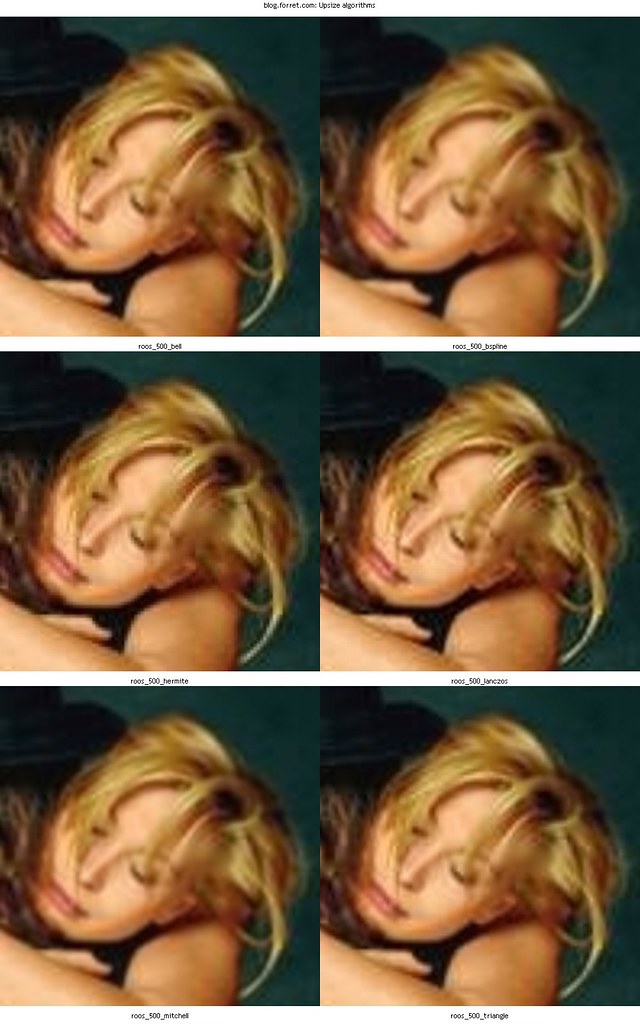
If you take a low-res picture, and you want to blow it up to a higher size, there are different algorithms to do the calculation of all those new pixels. I talked about this earlier in “How to upsize an image“. I went a bit further now and took a 100×100 pixels detail of a Roos Van Acker picture by Filip Naudts and enlarged it five times: to 500×500. The tool I use, Irfanview, has 6 algorithms to do resize:
Upsize picture from 100x100 to 500x500

Contrary to what I expected, it was not the Lanczos filter (slowest and ‘best’) that gave the best results, but the B-spline algorithm that’s supposedly a bit worse. With Lanczos you get an rastering effect (check her hair), with B-spline it’s more even.

Lots of New Year’s pictures

Lots of people have been taking pictures on New Year and this clearly shows in the stats of incoming pictures at two major photo hosting sites: Flickr and Smugmug.
Flickr reached a peak of nearly 100.000 pictures/hour (97.1 k#/h) and Smugmug a quarter of that (22.7 k#/h). That is 50% to 100% more than regular days.

Megapixel myth nuances

What’s the value of more megapixels? Is 10 megapixels better than 5? Here are some articles stating the opposite:

On the show, we did a test. We blew up a photograph to 16 x 24 inches at a professional photo lab. One print had 13-megapixel resolution; one had 8; the third had 5. Same exact photo, down-rezzed twice, all three printed at the same poster size. I wanted to hang them all on a wall in Times Square and challenge passersby to see if they could tell the difference.
(…)
I’m telling you, there was NO DIFFERENCE.
The Truth About Digital Cameras (NYT)

Megapixel apples and oranges
A 5-megapixel image that was created by down-sampling a 13 megapixel original is not the same as a 5-megapixel original. Why?
Well, let’s take a look at how a digital camera CCD sensor works. Natively the sensor is color-agnostic: pixels only measure light, not color. So the chip can only do greyscale images. A smart guy from Eastman-Kodak, Dr. Bryce E. Bayer, has however found a way to add color-sensitivity, by adding an RGB color filter array (the Bayer filter). Each pixel has a filter in front of it that lets through either the Red, Green of Blue light. Since the human eye is most sensitive to green, 50% of all pixels measure green, 25% do red and another 25% blue. A 5-megapixel image from the sensor is really a 2.5 MP green image, a 1.25 MP red and a 1.25 MP blue image, the three of them almost overlapping (1 pixel off). This is how the image is stored in RAW format. Each such pixel has a value between 0 and 4096 (12 bits). To convert it to a full-color image (8-bit value for each color R-G-B, so 24 bits for each pixel), the missing colors for each pixel are derived from the neighbouring pixels (aka demosaicing). E.g. a Red pixel has the exact value for the colour red, gets the green component from 4 neighbouring green pixels and the blue one from 2 neighbouring pixels. (More advanced algorithms exist) This gives some false colors (‘artefacts’) at sharp edges. Let’s simulate this with a pure black/white border:
Photography: RAW to JPG conversion

A pixel in a native 5-megapixel JPG image is based on 5 to 7 pixels of RAW color info. A pixel in a 5-megapixel camera that was downsampled from a 13MP image, gets its color info from roughly 20 pixels of original info. So the colors are more correct (provided the original picture was good quality, of course). Also, the color artefacts around sharp edges are much thinner so that they may almost disappear after the resizing.
Photography: RAW to JPG conversion
My point being: printing out a resized 5MP picture is not an honest comparison.

Canon 400D

Canon cameras on Flickr

The new Digital Rebel

It might be me, but it’s like everyone around me is buying the new Canon 400D. OK, that’s exaggerated, but I’ve spotted at least 2 people I know per week in this last month.

At €739 for a 10 megapixel digital SLR, it’s a sweet deal. The ‘old’ 350D (now €649) was already a really nice camera, but the added resolution (10 MP instead of 8 MP), the EOS Integrated Cleaning System and certainly the larger screen will probably make this one even a bigger best-seller. Which means I will have to cope with a lot of “Yours has only 8 megapixels? Mine has 10!” For the record: that doesn’t matter!

We blew up a photograph to 16 x 24 inches at a professional photo lab. One print had 13-megapixel resolution; one had 8; the third had 5. Same exact photo, down-rezzed twice, all three printed at the same poster size. (…) I’m telling you, there was NO DIFFERENCE.

How to upsize an image

Printing in larger sizes

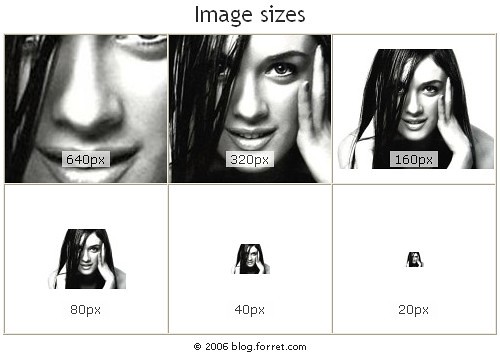
I have a Canon 350D digital camera. At 8 megapixels, it’s in the semi-pro league, and allows me to make 293mm x 192mm (11.5″ x 7.7″) hi-quality prints. That’s slightly smaller than an A4 (or Letter) sheet. Imagine now I would want to print on an A0 format or 1189mm x 841mm (46.8″ x 33.1″). That’s 16 times as big (height x 4 and width x 4). I could take a ‘normal’ image and rescale it to that size, but what would that look like? For every 16 pixels of the new picture, 1 would be an original one, and the other 15 would have been guessed from that and the surrounding pixels. This process is called image interpolation and there are different algorithms to do this. Let me show what that looks like.

Interpolation algorithms

Image sizes

Rule of thirds for Powerpoint

Just a thought I had:
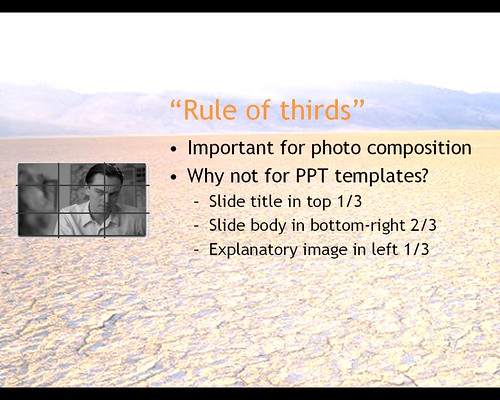
if the “rule of thirds” is so effective for photo composition, could it also be used to create more pleasing Powerpoint presentation designs?
An example of the layout dimensions could be like this (don’t focus on the boring picture/font, just the relative placement):
Rule of thirds for Powerpoint (no rules)