Skip to content

tool

Relaunch of launch.nuuz.io

Thi Saturday morning, I was browsing through my SimpleAnalytics stats and saw one sorry number for a side-project I had forgotten about: launch.nuuz.io. All of zero visits in the last month. This was a one-page website of mine that listed a number of launch sites for new projects (e.g. ProductHunt, HackerNews, Reddit etc.), and what the public consensus was on the best day-of-the-week and/or time-of-day for posting a new project. It also showed a countdown for that ideal submission moment.

Stuff to install on a new Windows PC

That is, the stuff I install on a new Windows PC. Since I need this list several times a year, why not make a blog post of it. As you will see,I have a more than average interest in video (conversion) and sysadmin (SSH/FTP). The links typically go straight to the download page.

id3.exe – ideal tool for tagging and renaming MP3 files

I want to mention a little tool that helped me out twice in the last week, and that I find very little info about online. It’s a Windows command-line MP3 file tagger and renamer called id3.exe. Since I forgot where I downloaded it from and Google doesn’t give me a clue either: here’s where you can download id3.exe.

ID3.exe can do several things, of which I will just cite the things I actually used:

  • it can obviously set ID3 tags in MP3 files (that is, ID3v1 and v2). The first time it adds ID3v2 tags which are stored in the beginning of the file (necessary when you need the info right when you start reading the file, like with streaming), the whole file has to be rewritten, but subsequent modifications are really fast.
    id3.exe -1 -2 -g [genre] -c "[Copyright notice]" -l "[Album name]" "%OUTPUT%"
  • set the ID3 tags of one file to those of another. I needed this when I transcoded MP3 files to a lower bitrate with LAME. LAME does not copy the existing ID3 tags to the new file. So I used ID3.exe to just copy those from the source file.
    id3.exe -D %INPUT% -1 -2 "%OUTPUT%"
  • Rename the file according to the MP3 tags. I had a big collection of MP3 files called “01 Track01” without any MP3 tags. I first set the ID3 tags based upon the folder structure (the folder name was the Album name), and then renamed them to “[Artist name] – [Album name] – [Track N°].mp3”.
    id3.exe -2 -f "%%a - %%l - %%t.rbs" "%OUTPUT%"
  • Id3 can also deduct album names, artist, song titles and track number from the complete filename + path.

MRTG data in XML format

Get ready for a lot of acronyms in this post: “How to create a good XML-based API for MRTG sensor data”.

MRTG

MRTG (Multi Router Traffic Grapher) is a tool to monitor the traffic load on network-links. It is widely used around the world to generate web pages containing images that provide a live visual representation of this traffic. MRTG is mainly a Swiss open-source product written by Tobias Oetiker from ETH Zurich with some help from others.

When used in its basic form (without RRDTOOL), it generates output like the following:
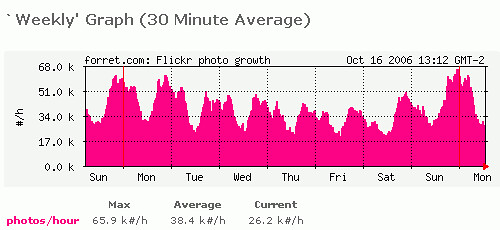
Flickr: #photos per hour

MRTG “API”

While MRTG was developed with network devices (routers) in mind, it can be used to show the trend of any numeric value over time. For that, it has a very simple input API: it expects 4 lines of text:

Line 1: current state of the first variable, normally 'incoming bytes count'
Line 2: current state of the second variable, normally 'outgoing bytes count'
Line 3: string (in any human readable format), telling the uptime of the target.
Line 4: string, telling the name of the target.

(*)
So there’s maximum 2 variables, which should be the same order of magnitude (or the automatic scaling of the Y-axis will make the smaller one undistinguisable of 0). The uptime and name show up in the “at which time ‘rou-rz-gw.ethz.ch’ had been up for 160 days, 8:02:55.” in the header of the HTML page.

MRTG in XML

In this world of REST, XMLRPC and SOAP interfaces, this seems so limited. Let’s try to make an XML format that allows the following:

  • it should minimally contain the four data lines cited above
  • it should be possible to add any parameter that influences the MRTG result (HTML and/or image) so that the XML as such is enough to define the whole MRTG configuration

This could be a minimal implementation:
Easy web page mockup tool

I’ve just finished a tool to make web page mockups. The purpose: make a quick draft of what a web page should look like, so you can include a screen shot in an email or a specifications document. When a client describes what page layout he wants in pure text, it is easy to misunderstand what he means. E.g. “two levels of menu should be visible on each page“. Ok, you want those as a bullet list in the side bar or a breadcrumb on top? It’s easier to just show him an overview of: that block goes there, that’s what I mean with two sidebars on the right, the tags are here at the right, under the recent comments.

Myers-Briggs typology: I’m an ENFP

Background

I have never been a big believer in astrology. I am not convinced the location of stars at the moment of your birth is that important to your personality. I’m a Virgo, but I don’t feel that defines me that much. But some years ago I discovered a ‘labeling’ system that was based on the actual behaviour of a person, whose result was much more significant: the (Jung) Myers-Briggs Type Indicator (MBTI):

According to Jung’s typology all people can be classified using three criteria. These criteria are: Extraversion/Introversion – Sensing/Intuition – Thinking/Feeling
Isabel Briggs-Myers added a fourth criterion: Judging/Perceiving
from humanmetrics.com

A good explanation of each criterium is:

  1. Where, primarily, do you prefer to direct your energy?
    If you prefer to direct your energy to deal with people, things, situations, or “the outer world”, then your preference is for Extraversion. This is denoted by the letter “E”.
    If you prefer to direct your energy to deal with ideas, information, explanations or beliefs, or “the inner world”, then your preference is for Introversion. This is denoted by the letter “I”.
  2. How do you prefer to process information?
    If you prefer to deal with facts, what you know, to have clarity, or to describe what you see, then your preference is for Sensing. This is denoted by the letter “S”.
    If you prefer to deal with ideas, look into the unknown, to generate new possibilities or to anticipate what isn’t obvious, then your preference is for Intuition. This is denoted by the letter “N” (the letter I has already been used for Introversion).
  3. How do you prefer to make decisions?
    If you prefer to decide on the basis of objective logic, using an analytic and detached approach, then your preference is for Thinking. This is denoted by the letter “T”.
    If you prefer to decide using values and/or personal beliefs, on the basis of what you believe is important or what you or others care about, then your preference is for Feeling. This is denoted by the letter “F”.
  4. How do you prefer to organise your life?
    If you prefer your life to be planned, stable and organised then your preference is for Judging (not to be confused with ‘Judgemental’, which is quite different). This is denoted by the letter “J”.
    If you prefer to go with the flow, to maintain flexibility and respond to things as they arise, then your preference is for Perception. This is denoted by the letter “P”.

from teamtechnology

Binary confusion: kilobytes and kibibytes

When I created my Bandwidth Calculator, easily the most popular web tool I ever made, I came across the following problem: in computer technology there is a habit of using kilobyte (kB) as 1024 bytes (as KB), megabyte (MB) as 1024*1024 (1.048.576) bytes. Most of you might think this is correct, but it’s not. The International System of Units (SI) (that defines the kilo, mega, giga, … and milli, micro, nano prefixes) uses only base 10 values. A kilo is always 1000, even for bytes. In order to find a solution for the IT ‘contamination’ of using kilo for 210 instead of 103, the IEC introduced new units in 1998:

Port redirection in Windows

We use port redirection/proxy often on our platforms. In the production setup, separate (Linux-based) servers take care of this, but for our development and testing environment, we need port redirection for Windows system. I generally use 2 command-line packages: