Skip to content

Web2.0

A picture a day: Flickr’s storage growth

Just how many pictures does Flickr receive every day? I found a way to estimate the # of images that they add to their database, and another way to get average (original) file sizes for those images. The result? Their storage growth, i.e. their upload bandwidth, and the growth rate of their storage system (how many days to reach a terabyte?)

Youtube for PDF: embedding documents

PDF Documents

Playing around with embedded Google calendars and reading “Google Apps and the power of embedded functionality“, I got to thinking: what would be other good candidates for a 1-click-embedding provider of other types of documents. I wondered e.g. whether there was something like Youtube for audio (yes, there is. GoEar.com is one example). But then I thought of a document type we all have learned to love and hate: Adobe’s Portable Document Format or PDF.

The idea behind the PDF file format is valuable: create a cross-platform standard for exchanging and printing documents that includes the text, images, fonts and their layout. The Acrobat Reader is a free application, and while Adobe’s PDF Writer is a commercial product (from $299), there are enough free alternatives to counter that. The thing is: PDF is great for printing, but not for browsing.

When you click on a PDF link, one of multiple things might happen:

  • If the web server does not send a header “Content-Type: application/pdf“, your browser has no clue what to do with the file: it will let you download the file and that’s all
  • if Acrobat is not installed, you can also only download the file, because your browser will not know what to do with files of type application/pdf
  • if Acrobat is installed, but you work with a browser that is not tightly linked to the OS (e.g. Firefox on Windows), it still might not open in Acrobat.
  • if your browser has configured Acrobat as a helper application, the file will download and will then be opened with the reader. So you will have 2 applications open: your browser and Acrobat Reader. This is actually the best method.
  • With Internet Explorer on Windows, Acrobat will open inside your browser, and your menu bar will become an interesting mix of IE and Acrobat options. (Where is the print button? Ah-ha!!) When you close the browser, a copy of Acrobat will continue to run in an invisible way, taking up some 32MB of memory
  • If you had no indication how big the PDF file was, you might be fiddling your thumbs for the next 5 minutes while the document is being downloaded.
  • If the document uses fonts that you don’t have, you might be looking at a very weird layout

So you are screwed if you don’t have Acrobat, if it is a really big document or if you access through a misconfigured browser. This is the equivalent of clicking on a .AVI movie file without a clue of how big the movie is, whether you have the necessary audio and video codecs to see it, and whether it’s worth it. If that was largely solved by a service provider like Youtube, what would a similar service for .PDF files look like?
How to visualize a timeline

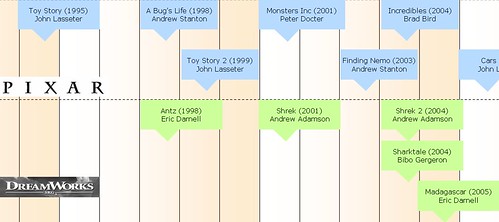
I am working on a timeline of animation movies: specifically to see when Disney started to fade and Pixar/Dreamworks took over. What films were made when, who made them and in what way do they coincide with activities of e.g. Steve Jobs. Oh, and to see where that new contender, Blue Sky Studios (“Ice Age”) fits in.

I first started out with Excel: I figured I’d have a bunch of dated events and throw a quick XY chart onto it. But that didn’t feel right. I then turned to Powerpoint and created a horizontal timeline, on which I could place blocks. That works OK for events that are far apart, but not for a quick succession, nor for events with a duration (from … to …). And, frankly, it looked rather ugly:
Timeline: animated movies

Which left me with two questions:

  1. how do other people create their timelines, and
  2. are there on-line tools that let me do it easily?

Adsense: The long tail of spare change

Google dollars

Last year, Google took in about $2.7 billion through ads on other people’s sites, accounting for 44% of its ad revenues. Most of that money probably came through big sites, but a decent portion must have come from the little guys. When you add up all the under-$100 AdSense balances earned by the Scott Karps of the world, the total must be a pretty impressive number. That’s free working capital for Google, or it can invest the stash and make even more money. It’s a devilishly good idea.
roughtype.com via kingsley2.com and google.blognewschannel.com

Nicholas Carr then goes on clarifying that if you have more than $10 on your account, and you officially terminate your Adsense account, Google will send you the money anyway. In any case, there are thousands of Adsense accounts with sleeping money that cannot be touched until they break the $100 barrier.

BUSINESSMODEL?

Let’s see, thousands of small $ amounts that are blocked, that still represents tens (hundreds?) of thousands of dollars. Let’s see if we can come up with a business model to recover some of that money without breaking the Adsense Terms of Service.
Goal: fill the bucket, i.e. reach the $100 mark and then leave.

Web-based web development

Writing code in your browser, it’s coming this way, I tell you! Some indications:

my own WikiRAD article (July 2005)
Playing around with PHP and wikis at the same time made me think on how web-based editing and compiling would be a good way to develop and run web applications
Feed43

Create an RSS feed out of any web page by using regular expressions with a nifty Web2.0 user interface. Lots of services are based on URLs and use RSS as input, so this can be the start of a first application. E.g. I just created an RSS feed for the Stubru playlist pages out of a Stubru Javascript file. Imagine I could now tell Feed43:

for each item in feed_that_I_just_created {
parse_the item_url
publish an rss feed for this item_url as feed_url_X
}

and then start working with that content too.

Amazon S3
web-based outsourced storage for any application, which made John Keyes and Peter Van Dijck to ask themselves: “Can you use Amazon S3 to create the new Flickr killer?”, and which made me think: but what if not only the storage, but the whole program was run by a 3rd party?
Iamalpha (via Richard McManus)
AOL’s new initiative for building microformat-based applications. It’s a bit early to grasp the extent what what they’re trying to accomplish, but I think it’s potentially more than just widgets. They don’t have a web-based IDE yet, but they do have a copy/paste code-validator. Most importantly: the applications are run by AOL!
YouOS (via Jeremy Zawodny)
YouOS: web-based IDE
a web-based OS that allows you to develop Javascript-based applications in a web-based IDE, with version control and compiling. It’s one of the products coming out of Paul Graham‘s Y-combinator startup incubator.

Google buys Writely

Google has just confirmed to have bought Upstartle, the creators of Writely (Writely Blog/GoogleBlog via Om Malik). Apart from being good news for the founders of Upstartle, this also indicates Google’s determination to make the fat client history and allow users to do all their business through on-line services.

Now buying Writely is in line with Google thinking of using browser for everything. I mean an online word processor, and online excel spread sheet make a lot more sense than making people switch to OpenOffice.
Om Malik

Om started making a Microsoft office/Google Office comparison matrix, and I took the liberty of adding some stuff to it:

Productivity on-line

I will list a number of (‘productivity’) application types, with the current (‘fat client’) most used software, and the on-line web2.0-ish (‘thin client’) applications that are trying to take over (although for some areas the online applications are only just at the beginning):