DrupalPress, Matt vs Dries
On my left side: Matt Mullenweg:
Every now and then I get a request to use pictures of mine for a poster, a flyer, a book. People usually find the pictures they want in my Flickr sets, where they are available in a max resolution of 1200 pixels for the longest side (so e.g. 1200 x 800 for photos in 3:2 aspect ratio). When this is not enough, people ask me for higher resolution versions. And that question comes in two versions:
Via Pietel I heard of a Twitter account that publishes the playlist of StuBru in real-time. Interesting, but I listen to FM Brussel. How hard would it be to make the same thing for FM Brussel? Not that hard, it appears. After some twiddling with curl, twitter API and other PHP, here is the Twitter account for the playlist of FM Brussel.
I’ve been thinking about writing this for a while, but I always thought everyone would probably work in the same way. But then I got introduced to iPhoto, which I consider a sh*tty piece of software, so apparently not everyone is as spoilt as us PC users. So here it goes: how do I process all the pictures I take, easily a thousand per month?
As you might know, I’m a Canonista, I use a EOS 350D digital SLR. I’ve got two CompactFlash cards of 1GB, of which I use the second one only rarely. I don’t take my photos in RAW format, I use the highest JPEG resolution: 3456 x 2304 pixels or 8 megapixels. On a 1GB card I can get between 250 and 300 pictures.
One of the best places to look for high-quality movie trailers is Apple Trailers. They have lots of bandwidth and a large selection (altough they don’t have e.g. the new Indiana Jones 4 trailers, which are exclusively on Yahoo HD trailers).
Apple typically offers its HD trailers in 3 formats: 480p, 720p and 1080p. The “p” stands for “progressive” i.e. not interlaced, every frame is a full picture instead of only the odd or even lines. The 480 in “480p” stands for the number of lines in the image. 480p is roughly equivalent with DVD quality, 720p is “HD Ready” and 1080p is “Full HD”.
But let me give a concrete example of the resolution of 3 trailers:

I’ve been playing around a lot with video conversion lately and one of the tools I use often is the Swiss armyknife for video manipulation ‘ffmpeg‘. It does format conversion (MPEG1/2/4, Quicktime, AVI …) , rescaling, recompressing, frame rate conversion … almost everything. It exists for all flavours of Linux/Unix, and also for Windows.
To give you an example: this is a script I wrote to extract screenshots of DVD files, straight from the disk.
1) the naive version
ffmpeg -i [input file] -r .05 -y [output name]%%03d.png
This does indeed extract a PNG image every 20 seconds (framerate = 0.05), but it does not take into account that the DVD image material is stored anamorphically. What you get is this:
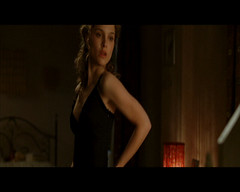
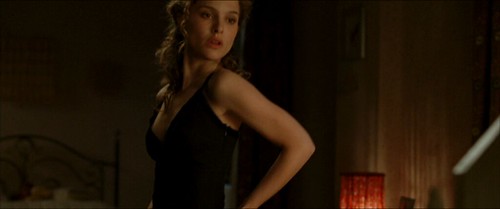
Natalie Portman looks really thin, but that’s because the image dimensions (720×576 pixels – PAL standard) are for 5:4 aspect ratio, and whereas the actual image should be 16:9. So let’s make the image wider while keeping it the same height.
2) Rescale to 16:9
ffmpeg -i [input file] -r .05 -s 1024x576 -y [output name]%%03d.png
The result looks better:
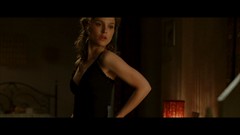
As you see, there are still black borders on the top and bottom. This is because a feature film is made in ‘scope’ format, with an aspect ratio of 2.39 instead of 1.78 (the decimal equivalent of 16/9). So, while the full width of the image is used, only 428 pixels of the height are actually in use. Let’s crop those black borders off.
3) Crop black borders away
ffmpeg -i [input file] -r .05 -croptop 74 -cropbottom 74 -s 1024x428 -y [output name]%%03d.png
4) old 4:3 movies
The older movies used a 4:3 aspect ratio, so when you extract them as 16:9 they look like a weight fell on them:
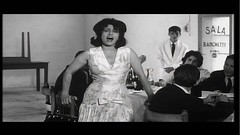
In those cases, you can use the ‘naive’ version above, which will give you:
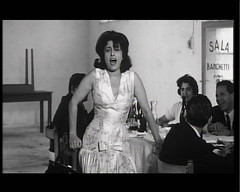
Here also, the actual 4:3 image is ‘letterboxed’ to the 5:4 DVD image.
My current favourite lens for my Canon 350D is the Canon EF 50mm F 1.8 II ø 52 mm. I really like the wide aperture (f/1.8) that allows me to take pictures without flash in dark environments like tango events, and the small depth-of-field that brings out the subject really nice. Plus, it was only 100€ when I bought it, and now it’s even at 84€.
 This weekend was filled with heavy alcohol, since I went to a whisky tasting. We only drank a ‘wee dram’ (2,5 cl) at a time, with some bread and water in between so we remained sober enough to listen to our sympathetic whisky expert who told us about malt, barrels and distilling.

I know I’m a bit late,and Ine, Bruno, Bart and … have already given their opinions, but I still needed an excuse to post some pictures of the event, so: last weekend I went to Pecha Kucha Brussels!
 As everyone already mentioned, one presentation really jumped out: professor Jean Paul van Bendegem with his presentation “Wunderkammer”. It started with the painting “The origin of the world” by Gustave Courbet, which is essentially a frontal view of the crotch of a naked woman, which of course is a good way to catch the audience’s attention.
He then started free associating via freemasonry, over the Sherlock Holmes society, over women’s bottoms, the painting of the nude woman in court (I forget the details) and ended with the painting of a man’s crotch called “The origin of war”. There was no real message, but the voyage was vivid and entertaining.
 After having Lacie, Maxtor, Iomega and most recently Netgear StorageCentral external storage fail on me, I am now the proud owner of a broken Western Digital My Book Pro II 1TB. I bought it less than a year ago and used it as a mirrored 500GB drive for my music, movies and images. It first failed 3 months ago (broken mirror) but after a full night of rebuilding it worked again. But now one of the drives has fallen victim to the infamous ‘click-of-death‘ and the drive would not show up anymore via USB nor Firewire. I disconnected the broken (SATA) disk, and then I could see the other one show up again as a lone 500GB drive. I quickly started copying to a 2 x 300GB FreeNAS system I had set up on an old Dell system (you don’t want to know how many old hard disks I have lying around). During the rescue operation the solo disk gave up twice, but by restarting the My Book device, it came back. So now I have an extra copy of all my data, most importantly my 80GB of photographs (quickly growing thanks to my Canon350D) and 120GB of iTunes music (mostly ripped CDs, not purchased, but still).

